Heater Assembly Bracket Rapid Prototype
SharkNinja New Product Development Co-op
Heater Assembly Bracket Rapid Prototype
SharkNinja New Product Development Co-op
Heater Assembly Bracket Rapid Prototype
SharkNinja New Product Development Co-op
Heater Assembly Bracket Rapid Prototype
SharkNinja New Product Development Co-op
Grace Sperling
Senior Mechanical Engineer - Consumer Products
Aeronautical Demonstrator-Capstone Project
May 2020 - May 2021
Team Members: Alastair Fisher, D Sterling Gray, Tyler Hill & Max Lacoma
Problem Statement
The professor at Northeastern University wants to add a lab section to his Introduction to Flight course. This lab would include students controlling the three control surfaces of an airplane to see how it affects lift and drag values. The airplane would sit in a wind tunnel that can go up to 20 m/s and is fully turbulent.
Fuselage Design
For this project, I took ownership of the main fuselage design. The design is loosely based off a Cessna 172 because our group used this aircraft for our initial calculations. The wings are mounted on top of the fuselage and it holds three motors to control the plane's ailerons, elevators and rudder. The plane also had to be able to be taken apart for easy access to the motors. The plane is split as top and bottom halves for easy assembly and disassembly. The bottom half previously contained three locations for our plane to connect to its strut, acting as a shift of center of gravity. However, this system was changed to incorporate a slider mechanism that the strut would tighten to. The tail of the plane mounts to the top half of the fuselage.

CAD of the Fuselage Halves
My teammates and I dived the plane's components and they were all incorporated together in a main assembly along with our hardware selections and electronics. (Assembly completed and managed by Sterling Gray). A final overview of the plane CAD can be seen below.

CAD of the Final Plane Assembly
Final Product
Our 3D prints were hand assembled and housed all the motors and the gyroscope needed to control the plane's movements. This all read to an Arduino with an LCD screen and could be controlled by a custom MATLAB program (completed by Max Lacoma). The plane was successfully able to read out values of lift, drag and pitch, roll and yaw to the user. The control surfaces were successfully controlled by the MATLAB program and moved the plane accordingly. It also successfully showed the user how unstable flight could be fixed by changing the control surface angles to be stable.
Example of the MATLAB interface with Unstable Flight
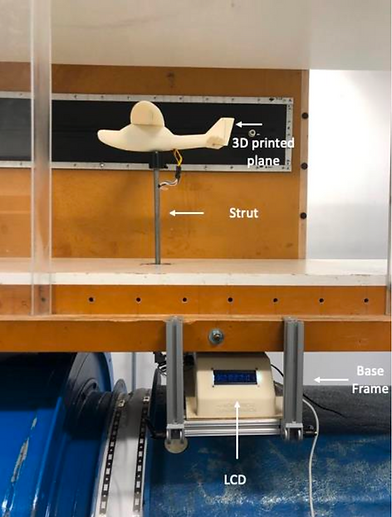
Final Product Setup in the Wind Tunnel